



Top Tools to Effortlessly Find and Remove Duplicate Files
Discover the best software solutions like Gemini 2, dupeGuru, CCleaner, AllDup, and more to efficiently clean your storage from duplicate images, documents, and music files.
Over time, duplicate files such as repeated downloads, identical photos, and music tracks accumulate on your storage devices, cluttering your system and wasting valuable space.
Manually locating and deleting these duplicates can be tedious and time-consuming. Fortunately, specialized tools are designed to quickly scan and remove duplicate files, streamlining the cleanup process.
CCleaner

CCleaner is a widely used cleaning utility that not only removes system junk and browser histories but also identifies and deletes duplicate files to free up disk space.
Supported Platforms: Windows, Mac.
Pricing: Free version available; advanced features at $24.95.
Download CCleaner →
dupeGuru

dupeGuru excels at detecting files with identical or similar names and content. It is especially effective for music files, identifying duplicates even when tags differ. Additionally, it compares images to find exact and similar photos.
Available for Mac and Linux, with a fully functional Windows version downloadable from the official site despite discontinued support.
Supported Platforms: Windows, Mac, Linux.
Pricing: Completely free.
Download dupeGuru →
SearchMyFiles

SearchMyFiles is a powerful search utility with flexible filtering options, enabling precise duplicate file detection and removal according to your preferences.
Supported Platforms: Windows.
Pricing: Free.
Download SearchMyFiles →
Gemini 2

Gemini 2 is a popular Mac application designed to locate identical or similar files, highlighting differences between them. It efficiently scans Photos and iTunes libraries, using an intelligent algorithm that learns which files you keep or delete.
Supported Platforms: Mac.
Pricing: $19.95.
Download Gemini 2 →
AllDup

AllDup is a free yet powerful tool that searches, deletes, copies, and moves duplicate files, including audio files with different tags. It offers customizable search settings and an integrated viewer to help you decide which files to remove.
Supported Platforms: Windows.
Pricing: Free.
Download AllDup →
Duplicate File Finder

Duplicate File Finder swiftly locates file copies on your hard drive and local network. It supports image and music comparisons by tags and content, with a preview function to ensure safe deletion. However, many features require the paid version.
Supported Platforms: Windows.
Pricing: Free basic version; $29.95 for premium features.
Download Duplicate File Finder →
Total Commander
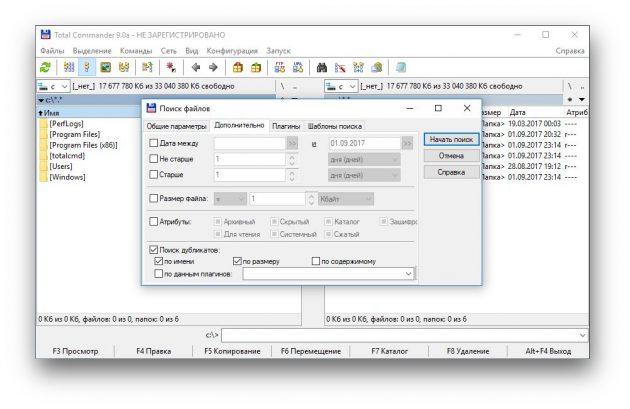
Total Commander is a versatile file manager capable of performing numerous tasks, including finding duplicate files. You can activate duplicate search within its search parameters alongside other file attributes.
Supported Platforms: Windows.
Pricing: $43.90.
Download Total Commander →
Among these options, dupeGuru stands out as a comprehensive and free solution for eliminating duplicate clutter, although Windows users may prefer AllDup due to discontinued Windows support for dupeGuru. CCleaner and Total Commander offer more general utility and are commonly installed on many systems.
Discover engaging topics and analytical content in macOS Technologies as of 29-05-2021. The article titled " Top Tools to Effortlessly Find and Remove Duplicate Files " provides new insights and practical guidance in the macOS Technologies field. Each topic is meticulously analyzed to deliver actionable information to readers.
The topic " Top Tools to Effortlessly Find and Remove Duplicate Files " helps you make smarter decisions within the macOS Technologies category. All topics on our website are unique and offer valuable content for our audience.