


Unlock Hidden iPhone Camera Features to Capture Stunning Photos
Discover five essential iPhone camera tricks that will transform your photography skills and help you take breathtaking photos effortlessly.
Smartphones today are incredibly versatile gadgets capable of much more than just browsing the internet or chatting on social media. One of their standout features is the camera, which for many has replaced traditional cameras entirely. However, not everyone gets consistently great shots. In this guide, we'll explore five powerful iPhone camera features that you might not know about, and how to use them to elevate your photography game.
1. Enhance Your Shot Composition with the Grid

A well-composed photo is already halfway to being great. Many users overlook this and place subjects awkwardly within the frame, which can detract from the overall image quality. The iPhone’s grid feature overlays a set of lines on your viewfinder, helping you align your subject according to the rule of thirds and maintain balanced proportions.
To enable it, go to Settings > Photos & Camera > toggle on Grid. While your photos won’t instantly become perfect, practicing with this guide will make it easier to capture beautifully composed shots.
2. Control Lighting with Exposure and Focus Lock
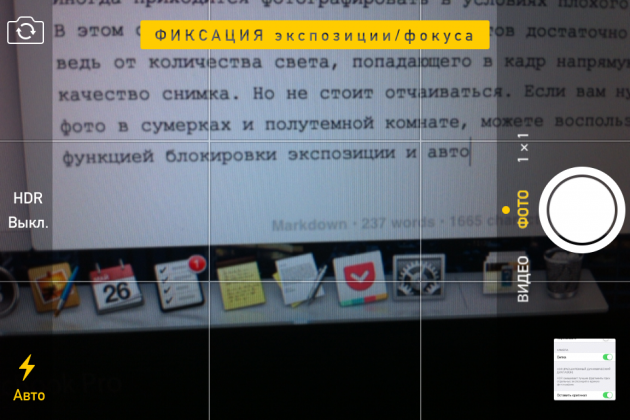
Low-light environments can be challenging for photography, often leading to grainy or blurry images. Luckily, the iPhone allows you to lock exposure and autofocus to brighten your shots without using the flash.
- Point your camera at a darker area of the scene and press and hold until you see “AE/AF Lock” appear.
- The viewfinder will brighten, allowing you to capture a clearer photo even in dim lighting.
This feature also lets you experiment with depth of field since both exposure and focus remain fixed.
3. Capture Expansive Landscapes Using Panorama Mode

Panorama mode is perfect for wide landscapes or large open spaces, yet it’s often overlooked. Here’s how to use it:
- Open the Camera app and swipe left to select Panorama mode (located at the far right).
- Tap the shutter button and slowly move your phone along the horizon line until the panorama completes automatically.
Did you know you can switch the panorama direction with a tap and even shoot vertical panoramas? This flexibility helps you capture tall or wide subjects fully within the frame.
4. Use Burst Mode to Capture Fast-Moving Action
Burst mode is a lifesaver for photographing dynamic scenes like sports, kids, or pets. By holding down the shutter button, your iPhone will take multiple photos in rapid succession—up to 30 frames per second on the latest models—ensuring you don’t miss the perfect moment.
Next time you’re capturing fast-paced action, try burst mode to increase your chances of getting that flawless shot.
5. Add Mood and Emotion with Built-In Filters
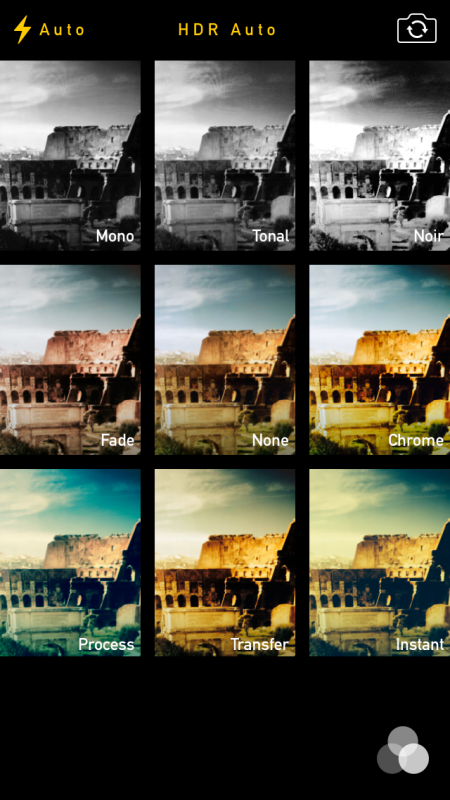
Previously, applying filters required third-party apps, but the iPhone camera now includes eight built-in filters, such as black & white and sepia. To use them:
- Open the Camera app and tap the icon with three overlapping circles next to the shutter button.
- Preview and select the filter that best suits your photo’s mood.
You can also apply these effects after taking a photo by tapping Edit in the Photos app and selecting the filter icon.
If you have any questions or want to share your own tips, feel free to comment below. Stay tuned for more exciting photography insights!
Discover engaging topics and analytical content in Expert Advice & Insightful Articles as of 29-05-2021. The article titled " Unlock Hidden iPhone Camera Features to Capture Stunning Photos " provides new insights and practical guidance in the Expert Advice & Insightful Articles field. Each topic is meticulously analyzed to deliver actionable information to readers.
The topic " Unlock Hidden iPhone Camera Features to Capture Stunning Photos " helps you make smarter decisions within the Expert Advice & Insightful Articles category. All topics on our website are unique and offer valuable content for our audience.