


Review of the Minimalist Text Editor Catlooking Writer
An insightful review of Catlooking Writer, a minimalist text editor designed to help you focus solely on your creative writing.
We have previously covered various minimalist text editors, as the pursuit of simplicity appeals to many developers. A straightforward text editor allows you to concentrate entirely on your writing without distractions like clock displays, pop-up notifications, or complex toolbars. It’s like picking up a blank sheet and writing freely, just like in the good old days.
Today, I want to introduce a special editor created by Lifehacker reader Alex Sychev (boligolov). We greatly appreciate when our readers share their ideas and projects, and we couldn’t resist reviewing Catlooking Writer.
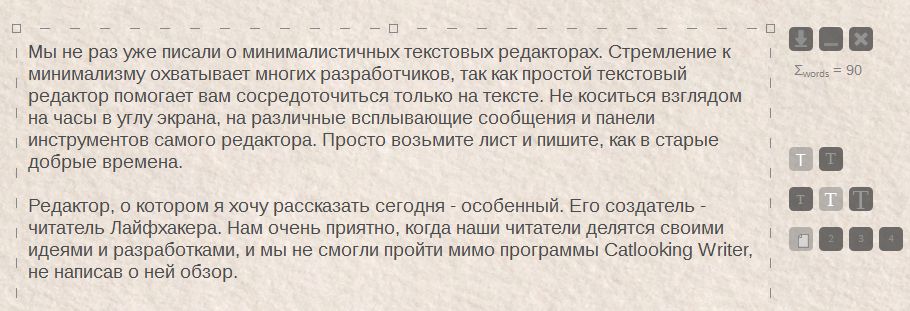
Upon launching the editor, you are greeted by a clean sheet of paper—not just plain white, but a soothing beige with a subtle texture. Writing on this textured screen feels like gliding a pen over quality paper, where the faint scratch of a nib gives birth to neat characters. This sensory experience is perfect for nurturing creativity.

On the right side, there is a compact toolbar that disappears as soon as you start typing and reappears when you move the mouse. The toolbar offers just a few options: you can change the font style and size, as well as the background and text colors. Background options include a darker, non-textured shade, light gray, and for night-time writing enthusiasts, a black background with green letters to reduce eye strain.
What are the advantages of such minimalism? There are no annoying editor suggestions or red underlines marking ‘incorrect’ words. You write exactly how you want!
Pressing the Esc key closes the program, but your text is saved automatically. When you reopen Catlooking Writer, your previous work is right there waiting for you.
You can save your text as a .txt file by clicking the arrow button on the sidebar. Nearby, you’ll find buttons to minimize or close the editor. Below these controls, the program automatically counts your words.
Catlooking Writer is compatible with Windows OS and Ubuntu.
This program is simple, visually appealing, and especially ideal for those who, like me, enjoy writing by hand in a notebook from time to time. It offers a creative vibe that encourages the crafting of masterpieces.
 1 / 0
1 / 0 2 / 0
2 / 0 3 / 0
3 / 0 4 / 0
4 / 0 5 / 0
5 / 0If this review hasn’t piqued your interest yet, watch this video. It perfectly captures the feelings you experience while using this tool. The musical background and simple narration will warmly connect you to the program.
You can download Catlooking Writer for free here: http://catlooking.com/.
Discover engaging topics and analytical content in Technologies as of 29-05-2021. The article titled " Review of the Minimalist Text Editor Catlooking Writer " provides new insights and practical guidance in the Technologies field. Each topic is meticulously analyzed to deliver actionable information to readers.
The topic " Review of the Minimalist Text Editor Catlooking Writer " helps you make smarter decisions within the Technologies category. All topics on our website are unique and offer valuable content for our audience.