


Moving from Android to iPhone: 12 Essentials to Know Before You Switch
Switching from Android to iPhone comes with several changes. This guide covers 12 essential tips—from app purchases to navigation—to help you switch smoothly.
Switching from Android to iPhone can feel different at first, but the transition is manageable with the right expectations. Here are 12 essentials to know before you switch, plus practical tips to adapt quickly and avoid common surprises.
1. Apps and purchases don’t carry over
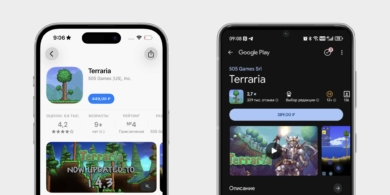
When you move to iPhone, most apps you already bought on Google Play or other stores don’t automatically transfer. In‑app purchases and subscriptions may be tied to your original account, not your iPhone. This means you may need to reinstall apps and sometimes repurchase items. Some progress in online services may remain accessible, while other items like extra filters or premium features might not.
On iOS, apps are installed exclusively from the App Store. If a needed app isn’t available in your country or region, you’ll face limitations. Here are a few common workarounds:
- Install via another iPhone user: you can borrow an app from a trusted iPhone user who has access to it.
- Change region: create a new Apple ID with the region where the app is available (for example, the United States or Japan). Payment will require region‑specific gift cards.
- Temporary access: some apps are distributed via developer betas or temporary profiles. These are time‑limited and may require reinstallation later.
There are alternatives, but after the simplicity of Android’s APKs, these steps can feel a bit tedious.
2. Paying with your phone isn’t universal everywhere
In some regions, you may not be able to use contactless payments as you do with Android. iPhone relies on Apple Pay for near‑field communication (NFC) payments, and not all cards from every country are supported. If your local bank isn’t compatible, you may need to use alternative methods.
Options include paying with a bank app via a QR code or Bluetooth, or adding an international card to your Apple Pay for online subscriptions or travel abroad.
3. Apps and subscriptions can cost more
The App Store often has higher prices for paid apps and in‑app purchases compared with Google Play. Developers face different commission structures, and certain programs can raise or lower costs. For example, Google Play requires a one‑time $25 developer registration, while Apple’s App Store demands $99 per year for publication. On top of that, Google Play typically takes 15% commission on sales, rising to 30% for developers who exceed $1 million in annual revenue. Apple’s standard commission is 30%, though small developers with under $1 million can join the Small Business Program for 15%. If revenue stays below the threshold, the reduced rate applies; once it grows beyond, the 30% fee applies to all sales.
Additionally, iOS users generally spend more on apps and subscriptions each year, which can influence pricing. Piracy factors on Android can also push developers to set lower price points or offer promotions to entice legitimate purchases.
OFFSET: While some costs differ, you may find value in the convenience and safety of the App Store’s ecosystem.
4. Windows syncing isn’t as intuitive
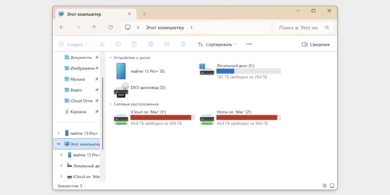
If you’re a Windows user, you’re used to easy transfers between your phone and computer. Android typically lets you copy photos and music via a simple USB connection. iPhone requires a different workflow: Windows users often need iTunes to connect and manage their device, while Mac users benefit from Finder support for direct file access.
On Mac, iPhone content appears in Finder automatically, while Android uses Android File Transfer for similar tasks. After years of Android‑to‑Windows ease, iPhone syncing can feel clunkier at first.
5. Flagship pricing doesn’t mean a high‑refresh screen
In many Android flagships, a 120 Hz display is common even on mid‑range devices. For a long time, iPhones offered high refresh rates mainly on Pro models. In 2025, the iPhone 17 line introduced a 120 Hz display on the base model, while some earlier base models remained at 60 Hz. If you’re a gamer or heavy phone user, the refresh rate is a key consideration when evaluating the price.
iPhones do offer excellent OLED panels with strong color accuracy and contrast, but the higher refresh rate matters for smooth motion and responsiveness.
6. Preinstalled apps can be deleted or replaced
Many Android skins include several preinstalled apps that are difficult to remove. iPhone takes a different approach: built‑in apps like Notes, Health, or Contacts can be removed, and apps such as Safari or Messages can be used alongside third‑party options like Chrome or Outlook. You can also set default apps for web browsing, email, and more, if you prefer non‑Apple options.
7. App settings are often out of the app itself
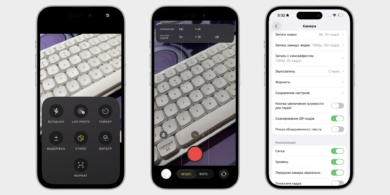
On iPhone, many customization options live in the Settings app rather than inside individual apps. Inside apps you can adjust only core features (like camera behavior or basic notes), while more advanced controls, such as notifications, privacy access, and permissions, are managed through the central Settings menu.
This means you may need to open the Settings app frequently to tailor notifications, location access, and app permissions to your needs.
8. Navigation isn’t fixed across apps
Android uses a relatively uniform navigation style across apps, with back buttons or swipes typically in the same place. On iPhone, app designers may place navigation elements differently, and back gestures can vary. Apple has tried to standardize parts of the experience in its own apps, but third‑party apps may still place controls with more variety.
A practical tip: you can usually go back with a swipe from the left edge, but this gesture isn’t universal across all apps, and some layouts may feel unfamiliar on large devices.
As you explore, you’ll get used to the app‑specific navigation quirks much faster.
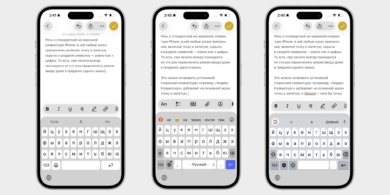
9. Punctuation hides behind the keyboard
On iPhone’s standard keyboard, punctuation marks, including the period and comma, are tucked into the symbol section. You’ll switch sections to type punctuation, digits, or special characters, which can slow you down at first. You can install a third‑party keyboard (for example, a popular international option) that places punctuation on the main screen for easier access.
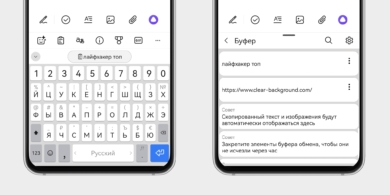
10. The clipboard history isn’t readily accessible
Android often shows a clipboard history and allows quick access to previously copied items. On iPhone, clipboard content isn’t visible until you paste, and new data can overwrite previous entries. Some third‑party keyboards offer clipboard history, but native access isn’t as convenient.
11. Face ID replaces fingerprint unlocking
All current iPhones rely on Face ID for biometric security. It’s fast and reliable, but you’ll usually need to bring the phone close to your face for authentication. If you prefer fingerprint scanning, you’ll miss it on iPhone and may need to rely on the passcode option or use accessibility features.
Android devices typically offer both face and fingerprint unlocks, which some users find more convenient in certain situations.
12. Many annoying things can be turned off
iOS is known for a highly controlled environment, which can feel restrictive. Yet a lot of irritants have simple workarounds or setting adjustments. If you don’t like a feature, you can often disable or customize it through the Settings app, though some steps may require a bit of digging.
We’ve written a separate guide with practical toggles to improve daily usage, so you can tailor iPhone to your needs with a bit of exploration.
Expert comment
Expert comment: A mobile UX expert notes that the switch is smoother when you anticipate app gaps and learn new navigation habits. With a bit of setup, most users feel at home in days rather than weeks.
Summary
Transitioning from Android to iPhone involves some trade‑offs, but most challenges become manageable with upfront planning. Expect differences in app availability, payment methods, and navigation, along with a few quirks in how settings are organized. With time and a bit of customization, you can adapt your workflow and enjoy the iPhone ecosystem.
In short, know what to expect, plan for gaps, and don’t hesitate to explore new ways to personalize your device. Your iPhone can become a natural extension of your daily routine.
Key insight: A proactive approach to understanding platform differences and customization options makes switching from Android to iPhone faster, smoother, and more productive.
Explore useful articles in Tech News as of 17-12-2025. The article titled " Moving from Android to iPhone: 12 Essentials to Know Before You Switch " offers in-depth analysis and practical advice in the Tech News field. Each article is carefully crafted by experts to provide maximum value to readers.
The " Moving from Android to iPhone: 12 Essentials to Know Before You Switch " article expands your knowledge in Tech News, keeps you informed about the latest developments, and helps you make well-informed decisions. Each article is based on unique content, ensuring originality and quality.